the singularity of being and nothingness
Posts tagged Sencha Touch

Documenting ExtJS/Sencha Touch Code with JSDuck
Jan 28th
This will be a short post, I promise 🙂
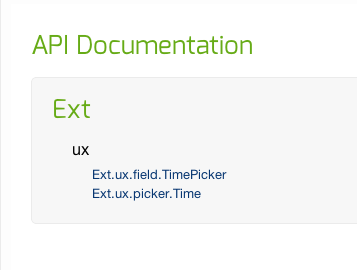
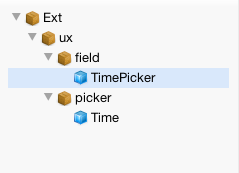
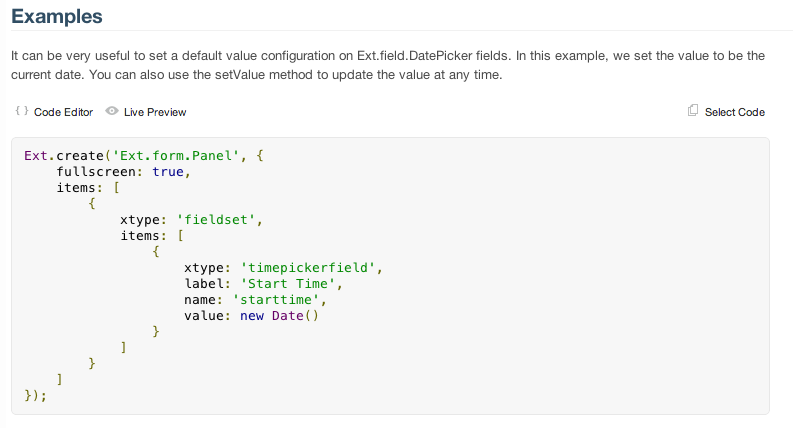
Recently, I posted my version of a time picker in Sencha Touch 2. As part of this, I wanted to *really* document the component. I decided to leverage JSDuck, the tool which is currently used by Sencha to provide API documentation for…well…everything that they do.
Beyond looking pretty flipping sweet, the awesome part about JSDuck documentation is that it’s in the vein of “self-documenting” code. That is, beyond a few configuration comments you might make here or there, nearly everything that JSDuck spits out in terms of documentation (or is that duck-umentation…ugh) comes directly from the code you write anyway. Pretty nifty.
Anyway, if you’re interested, check out the documentation for JSDuck, and enjoy the screenshots of my documented component below.
Share this:
Sencha Touch Theming: Custom UIs
Sep 23rd
During the course of developing your Sencha Touch app, you will inevitably get around to theming…after all, while the default styles are nice, they don’t exactly scream individuality. Fortunately, Sencha Touch makes theming ridiculously easy, and there are a lot of resources available to help with getting started with that.
But let’s talk about a specific example. Let’s imagine that you want to simply change the background color on your app’s toolbars. The first thing you’ll probably do is pop open Firebug or Developer Tools to inspect the CSS that’s being applied to your toolbar. Unless you’ve already customized it, you’ll probably seem something like this:
I’ve highlighted “x-toolbar-dark”, because by default, the “UI” configuration option for Ext.Toolbar is set to “dark,” which applies the “x-toolbar-dark” class to your toolbar (it will apply “x-toolbar-light” if you specify “light” for ui…more on this later).
Here’s what the toolbar actually looks like:
If you inspect the properties of this CSS class, you should see something like this:
- background-color: #456F8D;
- background-image: -webkit-gradient(linear, 50% 0%, 50% 100%, color-stop(0%, #9cbacf), color-stop(2%, #5182a5), color-stop(100%, #395c75));
- background-image: -webkit-linear-gradient(#9cbacf,#5182a5 2%,#395c75);
- background-image: linear-gradient(#9cbacf,#5182a5 2%,#395c75);
- border-color: black;
Nothing too crazy here…just some background-image gradients to give the toolbar a nice textured feel. Now at this point, you might be tempted to do something crazy, something More >
Sencha Touch EditableList
Sep 21st
Yeah, I know, I’m not the first person to the “create an EditableList for Sencha Touch” party. In fact, if you Google “sencha touch editable list,” you’ll find a lot of really nice code that will let you pretty easily integrate basic delete/sort functionality into your Sencha Touch app.
However, none of the offerings I ran across really fit the bill of what I was wanting, in terms of interface. Plus, it’s so much MORE FUN to build your own, right? Right!
What I WantedMy wish list for my EditableList was pretty straightforward: I wanted it to behave *more or less* like my iPhone’s Mail app list editing. This includes:
- One click to do a batch deletion/archiving of list items (btw, I absolutely HATE the same interface in the default iPhone text message app…)
- The ability to swipe-delete individual messages
- Some animations to make it somewhat mimic the iPhone Mail app’s animations (think “sliding” the deletion selectors in and out)
In addition to this, I wanted more or less everything-functionality, layout, interface-to be baked into my one custom extension. One of the things I didn’t like about some of the other solutions I found is that they required a certain structure external to the list More >
Sencha Touch: JumpToNode and the NestedList
Sep 7th
Sencha Touch’s NestedList is an excellent component for creating the compact “drill-down” effect that we’re all used to on our mobile devices. It’s super-flexible, too. Whether you have a canned set of items, or need to retrieve each “level” via AJAX, it’ll handle it.
I’ve used NestedList quite a bit, and have been generally happy with it. One of the issues I’ve come across, though, is that it does not (as far as I’m aware, at least) support jumping around to arbitrary nodes with the NestedList.
Huh? So here’s an example 😉
Let’s say you have a bunch of products that exist within categories of variable depth. Once you reach the “product” level of your NestedList, you can out-of-the-box call getDetailCard(), build out your detail view, and be done with it. NestedList will take care of the navigation bits, and your site’s visitor will get a nice “back” button to return to the category list they used to get to the detail product.
Fine and dandy. BUT…what if you have links on your detail “card” to related products? Maybe these products exist in the same category, at the same “depth” in the nested list. But maybe instead they are in an entirely different category, More >
Sencha Touch Theming: 1.1.0
Apr 23rd
In my last article, I showed how to get setup and started with creating custom stylesheets. After a significant release (1.1.0) and several reader requests, I’m updating the walkthrough with screenshots and instructions for v1.1.0. This version will be strictly business: for discussion about the more interesting points of what’s going on, refer back to the original post 🙂
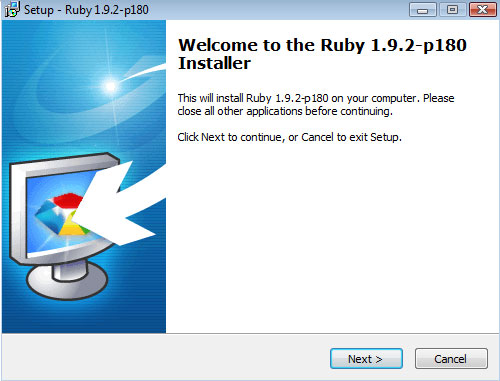
Step 1: Install RubyTo get SASS setup, you’ll first need to install Ruby and Ruby Gems (SASS is bundled with something called “Compass”, and Compass is a “Gem” that can be added into Ruby). You can go the painful route and install Ruby and then add Gems into it. However, if you’re stupid about these things, you can do what I did and just grab the Ruby 1.92 installer–it comes pre-built with Gems already configured.
Get the Ruby 1.92 Installer When prompted, choose “”Add Ruby executables to you PATH”I installed to the default directory on Windows (C:\Ruby192\)
Step 2: Setup CompassNow that Ruby is installed, the next step is to get Compass (e.g., SASS) setup. This step actually took me the longest, simply because I’m stupid about command-line stuff. So here’s a play-by-play of what to do (this is for Windows…I assume Mac More >
Sencha Touch Theming: Building Our Custom Stylesheet with SASS
Mar 7th
Ok, let’s recap. So far, we’ve looked at some basic concepts related to how to approach modifying a Sencha Touch app theme, as well as walked through exactly how all the pieces fit together in the SASS magic. With all this behind us, it’s finally time to create a custom .scss file-let’s get started!
Setting Things UpIn the following example, we’ll be doing some minor riffs on the standard sencha-touch.css file. If you’re in the mood for a super-customized theme of your own, well, you’ve got a lot of work ahead of you. Instead of jumping headfirst into something like that, why not start with some small changes, and build from there?
First things first, we need to decide where we want our new .scss file to live. While we can put it in the /resources/sass/ folder where the other core ones are, for this example we’ll create a new folder at the same level…just to keep things straight. I’m going to call mine “custom” (pretty creative, eh?).
Now, in order for us to let Compass know where our .scss file lives, we need to create our own config.rb file (check out the last post for more info about this). I’ll create that file, and here’s More >
Sencha Touch Theming: The Lay of the Land
Mar 6th
If you followed the steps in the last post on setting up your development environment to leverage SASS, you should be all set to start rocking some seriously awesome custom themes for your Sencha Touch app. But before you dive in, you might take a few moments to take a deep breath and survey all that’s going on to build out the default Sencha Touch theme.
It’s not that you couldn’t immediately jump in and produce something awesome-you definitely could, and it would be pretty simple. I suggest browsing the default theme, however, because despite how easy it is to being customizing your own .scss file with new colors, icon masks, and whatever else strikes your fancy, actually understanding (if even in a very preliminary sort of way) what’s going on will help prevent future frustrations that may dampen your sudden excitement to start theming.
With that thought in mind, let’s take a few moments to peek around the default theme to see how the magic happens.
config.rbIn your Sencha Touch installation, browse to /resources/sass/. In this folder, you’ll see a file named config.rb. This file, written in Ruby, is one of those “setup it up and leave it alone” kind of files. More >
Sencha Touch Theming: Getting Started
Mar 5th
If you’ve worked with Sencha Touch for more than 5 minutes, you have GOT to appreciate the aesthetics which the framework brings out of the box. You literally have to do nothing at all in order to get a slick, polished looking interface that works in webkit browsers and on iPhone and Android devices.
However, if you’re like me, you probably get to the point with your apps where you want to customize the look and feel. I mean, while the Sencha Touch default palette is nice, it’s pretty generic, so before long you’ll need to start developing a custom theme for your app.
An Abortive StartInitially, this can be a challenge with Sencha Touch apps. The challenge stems not from the fact that anything magical is happening behind the scenes: it’s just JavaScript, CSS3, and HTML after all. Rather, it’s the way that it’s all packaged up.
If you take a look at one of the stylesheets, you’ll notice how crazy complicated they are. Let’s say you wanted to change the color of all the navigation backgrounds, for example. Well, you could use Chrome’s developer tools to inspect each and every interface, grab the selectors, and then try to overwrite them with a More >
My First Sencha Touch App
Feb 21st
As readers of this blog know, I’m a pretty big Sencha fan. I <3 ExtJS…seriously, I love pretty much everything about it, from how great the default UI is, to how ridiculously easy it is to build awesome applications in zero time. So when I heard a while back that Sencha was combining ExtJS, jQTouch, and Raphael to create a mobile framework (Sencha Touch), I knew it was something I’d have to try.
And try I did…well, really, it was more like dabbling. I had ideas that I wanted to test out, so over the last few months I’ve been experimenting in between life and other projects. But no matter how hard I tried or how good my ideas were, I couldn’t really find the motivation to bring anything to completion…or even to a real start. Until this weekend.
The CatalystYou see, my darling 5-year old daughter is valiantly learning to read. But like a lot of kids (I think), she has trouble staying motivated and gets frustrated easily when she’s not able to hit a home run with the new things that she tries.
As I’ve been working with her on reading, I have reflected on my own experiences. While I’ve always loved More >