the singularity of being and nothingness
existdissolve

This user hasn't shared any biographical information
Homepage: http://existdissolve.com
Jabber/GTalk: existdissolve
Posts by existdissolve

ExtJS Quickie: Full Width Text Fields
Jul 17th
Ok, so a lot of posts I make are not so much about “hey, look at this cool thing I figured out” as much as it is saving a reminder of myself for how to do something when I inevitably forget it later on
So for today’s example, the problem I was having was how to make a textfield fill up 100% width of a panel. I think in earlier versions of ExtJS, there was an “autoWidth” option, but alas, it doesn’t work in ExtJS 4. Moreover, using “width: ’100%’” doesn’t work either, since the width option expects a numeric value.
Turns out, this is pretty stupid and simple. Here’s a quick example:
Ext.define("Gloss.view.search.Form", {
     extend: 	"Ext.form.Panel",
     alias:     "widget.searchform",
     frame:	true,
     items: [
          {
              xtype: 	"textfield",
              anchor:	"100%"
          }
     ],
     initComponent: function() {
          this.callParent(arguments);
     }
});
As you can see, adding in the “anchor: 100%” solves the issue quite nicely. Now, as the container is resized, the textfield will resize as well.
ItemClick and ItemContextMenu
Jul 8th
Custom context menus are one of the features of ExtJS that I love. They are stupid simple to add in, and ridiculously customizable-they can really add some value to your app and help preserve real estate if you have a lot of embedded actions that need to happen.
For example, in one of my controllers, I’m looking for the “itemcontextmenu” event on a grid:
this.control({
    "bookmarks": {
       itemclick: function(...) {
          ....
       },
       itemcontextmenu: function(view,record,item,index,e) {
          var me = this;
          var r = record.data;
          e.stopEvent();
          if(item.ctxMenu) {
              item.ctxMenu = new Ext.menu.Menu({
                 items: [
                    {
                       text: "Delete This Thing",
                       icon: "images/delete.png",
                       handler: function(btn) {
                          me.deletebookmark(record,item);
                       }
                    }
                 ]
              });
         }
     }
})
One of the issues I was running into, however, was that whenever I would “right” click using my Mac’s “magic mouse” (e.g., Ctrl+click), both the itemclick AND itemcontextmenu events would fire.
To debug this, I took a quick peek at the “event” object passed on both methods. This object provides a bunch of information about the event that was fired, including:
- any keys that triggered the event
- whether Ctrl was pressed
- whether Shift was pressed
- what “type” of event (e.g., “click” for a mouse event)
Armed with this information, I was able to adjust my “itemclick” listener a bit, More >
Adding QTips to GridPanel Rows in ExtJS 4.0
Jul 4th
Need to add a custom tooltip (quick tip) to rows in a GridPanel in ExtJS 4.0? Super easy. In your column definitions, simply add a rendered, passing a custom function.
this.columns = [ { text: “Bookmark”, dataIndex: “title”, flex: 1, renderer: function(value,metaData,record,colIndex,store,view) { metaData.tdAttr = ‘data-qtip=”‘ + value + ‘”‘; return value; } }…
A couple notes:
- Make note of the “metaData” object. I think in earlier versions, the “tdAttr” was just “attr”…so if you’re upgrading, you might have to make a slight change
- Notice the namespace for the qtip. In earlier versions of ExtJS, it was “ext:qtip”, but has been changed to “dadta-qtip”…no biggie, but a headache if you didn’t read the docs
That’s it! With such a slight modification, you get a nice tooltip generated for each row in your grid. Enjoy.

If You Want a Good Zombie Movie, Follow the Rules
Jun 1st
Over the last month or so, I’ve watched a BUNCH of zombie movies. From absolute classics like Night of the Living Dead, to foreign offerings like The Horde, I’ve seen the good, the bad, and the terrible in the way of zombie movies. While this is to be expected of all movie genres (but perhaps especially those which tend to hover around the B-movie monicker), for me, it’s not the typical things that make zombie movies great or awful. Some movies live and die on acting, special effects, and plot. While these are certainly not un-important in a zombie flick, they don’t sit on the top of the list in my book. Rather, what makes a great zombie movie is one which follows the rules of zombie movies.
The RulesOk, first of all, I don’t think there are *really* any hard-and-fast zombie rules. Sure, some will argue about whether zombies should be able to run, or whether they should be intelligent enough to organize efforts on a minimal level, or whether they should have enough dexterity to turn a doorknob. But in my thinking, trying to pigeon-hole such an expansive field of horror-creature is just wrong.
So these are not the More >
Some Thoughts on ExtJS 4
May 26th
Very recently, Sencha released the newest version of ExtJS-4.0. This release was significant, in addition to other important changes, because ExtJS 4 signals a real shift in how Sencha is pushing developers to use ExtJS. Before, you could really kind of hack together ExtJS apps, regardless of how well your efforts aligned with “best practices.” The same is still true, I suppose, but ExtJS 4 is now all about MVC…and they are quite vocal about it.
By this, I mean that this rework of the framework has been explicitly designed, optimized and advertised to be used in a very particular MVC-ish way. There are even some fairly involved (but still inadequate, IMO) tutorials that describe the “preferred” way for designing a full-on MVC ExtJS 4 app, and the SDK comes with some tools baked in that will even build out the “preferred” structure for you.
So it just so happened that mere weeks after the release, I had the opportunity to develop a new app, and I decided to take the dive into ExtJS 4. Here are my thoughts on the experience, in no particular order.
Learning…and LearningFirst, the learning curve-for me at least-was initially pretty steep. It wasn’t so much the MVC aspect More >

Renaming Files in CFScript
May 13th
I’ve recently taken to writing all of my components in pure cfscript. To me, they look cleaner and are easier to navigate. Plus, I just really like cfscript
One of the challenges, of course, is that after using tags for so long, it can be sometimes challenging to find equivalent functionality in cfscript. Some tags expose functionality that may not be readily apparent in cfscript functions provided.
Take cffile’s “rename” action. If you look through the list of “FileXXXX()” methods, you’ll see a lot that correspond 1-to-1 with the tag actions. However, interestingly enough, there’s no FileRename() function.
Now you might think that this means that files can’t be renamed with using cffile. Wrong! You can simply use FileMove() to accomplish the rename. And actually, if you think about it, this makes sense. After all, when you move a file, you literally move it-so if the file is moved to a different or same location with a new file name, that’s the file that’s getting moved…no copy to worry about cleaning up after the face.
Ok, enough of that. So here’s a pretty ordinary file rename with cffile:
<cffile action=”rename” source=”c:\files\memo\readonlymemo.doc” destination=”c:\files\memo\normalmemo.doc”>
But we can accomplish precisely the same thing with FileMove():
filemove(c:\files\memo\readonlymemo.doc, c:\files\memo\normalmemo.doc);
Pretty nice!
More >

ColdFusion Wrapper for Aviary Effects API
May 11th
Sometime last week, Aviary (the super-sweet collection of online image editing tools) launched their new developer site, along with a new Effects API. When I see “API,” I think “ColdFusion wrapper,” so that’s exactly what I did
- Online demo of API in action
- RiaForge Project
- GitHub Repo

A Broken Ethic of Love
May 3rd
Love your enemies and pray for those who persecute you; but rejoice when they get a bullet to the head - Jesus, Matthew 5:44
I’m late to the party. Bin Laden is dead, and everyone and their mother has blogged their brains out about it. Alas, it cannot be helped…
I’m at a loss for words because I’m genuinely filled with sadness about this day. I’m saddened because I’ve seen Christians-many of them unwittingly-rejoice and exult in the death of Bin Laden. I sincerely don’t mean this in a judgmental way-I have enough flaws of my own to not waste my hypocritical breath on others. But I’m saddened because my tongue-in-cheek revision of Jesus’ directive to love seems to have actualized itself in far too many ways.
I’m saddened because barely one week after Easter, we’ve forgotten the profundity of forgiveness and the depths of divine love (did we realize it to begin with?) that was displayed unconditionally to an infinitely twisted, broken, hostile, rebellious, and murderous race.
I’m saddened because on Divine Mercy Sunday, where all are invited partake of the Eucharist and find salvation, hearts are yet closed and actually rejoice in the destruction and presumed damnation of a human person…even if he was an More >
IE9 Support for Gloss
Apr 24th
Today I released a major revision to Gloss…it now supports IE9!
One of the reasons I hadn’t provided support for IE9 was because of a bug in ExtJS’s TreePanel, which would not correctly attach events to tree nodes. However, I found a nice workaround (read hack) that resolved the issue, so now I’m pleased to release this app for IE9 users.
One of the things I am pleasantly surprised about is how darn well Gloss operates in IE9. The animations are smooth, the page loading is super-quick, and it’s just all-around a very slick experience.
So if you’ve wanted to use Gloss, but were impeded because of the lack of IE support, now’s your chance to turn over a new leaf
TECHNICAL NOTE: Because of the necessity of localStorage for Gloss, running Gloss in IE9 will only work correctly if you are running in IE9 Standards Mode.
Sencha Touch Theming: 1.1.0
Apr 23rd
In my last article, I showed how to get setup and started with creating custom stylesheets. After a significant release (1.1.0) and several reader requests, I’m updating the walkthrough with screenshots and instructions for v1.1.0. This version will be strictly business: for discussion about the more interesting points of what’s going on, refer back to the original post
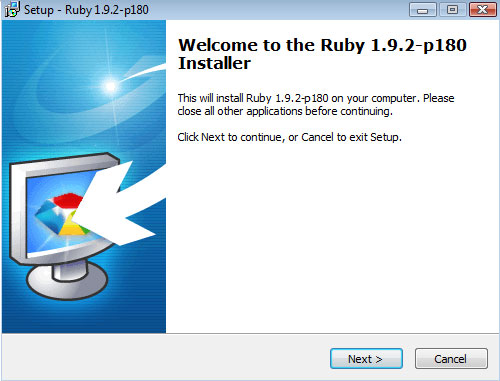
Step 1: Install RubyTo get SASS setup, you’ll first need to install Ruby and Ruby Gems (SASS is bundled with something called “Compass”, and Compass is a “Gem” that can be added into Ruby). You can go the painful route and install Ruby and then add Gems into it. However, if you’re stupid about these things, you can do what I did and just grab the Ruby 1.92 installer–it comes pre-built with Gems already configured.
Get the Ruby 1.92 Installer When prompted, choose “”Add Ruby executables to you PATH”I installed to the default directory on Windows (C:\Ruby192\)
Step 2: Setup CompassNow that Ruby is installed, the next step is to get Compass (e.g., SASS) setup. This step actually took me the longest, simply because I’m stupid about command-line stuff. So here’s a play-by-play of what to do (this is for Windows…I assume Mac More >